Integrations · MISP
Use the HoneyLabs default feeds in MISP
Since MISP PR #10864, two HoneyLabs feeds are part of MISP's shipped feed metadata: active exploiters (source IPs that sent an exploit or loader command to our sensors in the last 7 days, recognised research scanners removed) and malware infrastructure (live IoT botnet loader URLs). There is nothing to install and no API key. This guide covers enabling them and what they do once cached.
- 01
Find the feeds
They are already in the feed list on a current MISP. Go to Sync Actions, then List Feeds, and filter for HoneyLabs. If your instance predates the merge, update MISP or click Load default feed metadata on the same page and they appear.
Sync Actions -> List Feeds -> filter "HoneyLabs" HoneyLabs active exploiters csv ip-src attributes HoneyLabs malware infrastructure freetext url attributes - 02
Cache or fetch
Caching hashes every feed value so your own attributes show a feed hit when they match; it is cheap and the usual first step. Fetching stores the feed as a normal MISP event with attributes you can export, tag, and push to other instances. Both honour the feeds' delta merge, so the data tracks the live window instead of growing forever.
# tick both feeds, then either: Cache all feeds # correlation only Fetch and store all feed data # full events - 03
Read the hits
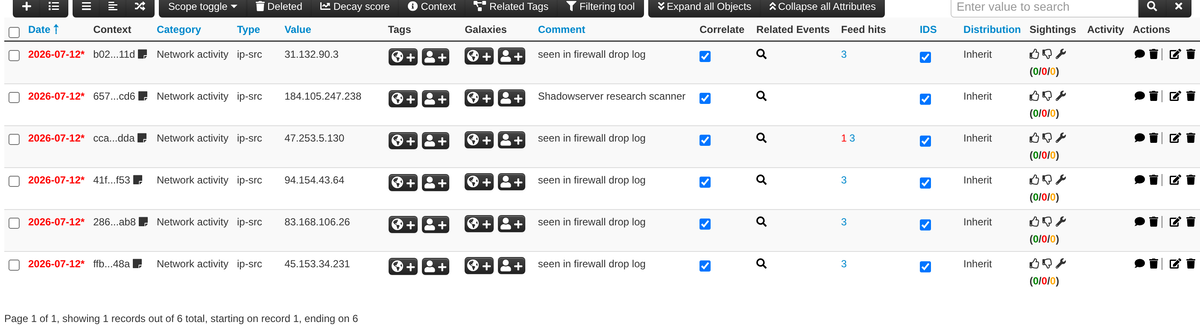
After caching, any event attribute that matches gets a Feed hits entry linking back to the feed, and the event sidebar lists it under Related Feeds. Recognised research scanners (Shadowserver, Censys and the rest) are excluded from the exploiter feed before it is built, so a hit means the address was caught attacking, not cataloguing. Each IP also has a public page at honeylabs.net/lookup with the ports it hit, its JA4 fingerprint, and first and last seen.
# spot-check any value against the caches without an event: Sync Actions -> Search Feed Caches -> <ip> - 04
Get context on every hit: the MISP-format feed
The csv and freetext entries carry one value per line, so a hit shows a bare address. The same two feeds are also served in MISP's native feed format: one event per day of last sighting, and every attribute with a comment (how many loader events, the sighting window, ASN and country, a lookup link), tags and a timestamp. MISP only re-fetches the days whose manifest timestamp moved. Add it as a feed next to the defaults, with the URL ending in /misp.
# MISP -> Sync Actions -> Feeds -> Add Feed Provider : HoneyLabs Input Source : Network Source Format : MISP Feed URL : https://honeylabs.net/feed/exploiters/misp # and a second feed for the loader URLs: URL : https://honeylabs.net/feed/malware-infrastructure/misp - 05
Optional: your own queries as feeds
Any saved HoneyLabs query (a port, an ASN, a CVE, a boolean combination) can be minted as a tokened feed on the feeds page and added to MISP as one more network feed. Same mechanics, your query.
# MISP -> Sync Actions -> Feeds -> Add Feed
Provider      : HoneyLabs
Input Source  : Network
URL           : https://honeylabs.net/feed/<token>.csv
Source Format : Simple CSV
Value field   : 1
Settings      : enabled, caching enabled
Worth knowing
- The exploiter window is 7 days and doubles as expiry: an IP that goes quiet drops off, and delta merge removes it from the fetched event on the next pull.
- The malware-infrastructure feed is IoT and Linux botnet loader URLs (mostly Mozi and Mirai variants), not a general malware feed. MISP imports each line as a url attribute.
- Per MISP's feed overlap matrix, the exploiter list overlaps blocklist.de and CINS Army by about 20 percent each; the rest is not on either.
The feed is plain text (one IP per line), CSV, or JSON, is revocable per token, and is edge-cached for five minutes, so a tight refresh schedule never hammers anything. Create yours on the feeds page, or browse the other integrations.