Integrations · Microsoft Sentinel
Pull HoneyLabs intel into Microsoft Sentinel
Sentinel ships a TAXII data connector, and HoneyLabs runs a TAXII 2.1 server at honeylabs.net/taxii2/. Give the connector our API root, a collection ID, and a free API key as the password, and indicators land in ThreatIntelIndicators on the schedule you pick. Every one is backed by an address that ran an exploit or loader command against a sensor or logged in to one and ran commands, so it carries a confidence score you can set a threshold on rather than a flat reputation flag.
What you get
Indicators that carry their own evidence, and expire on their own
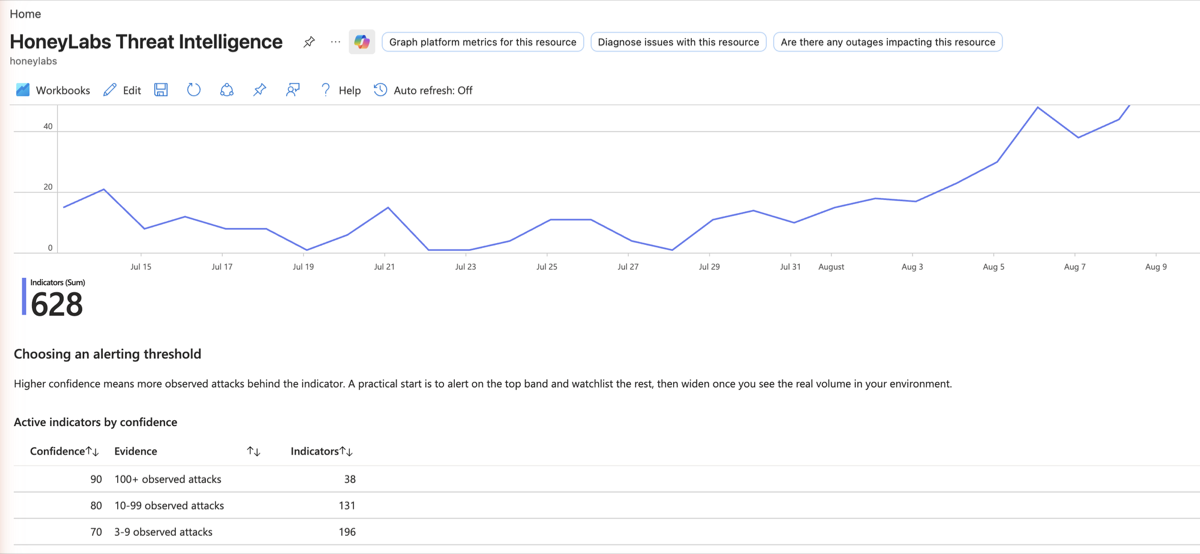
Confidence grades what is behind each indicator: 90 means a hundred or more observed attacks, 60 means a single sighting. That is what lets you alert on the top band and watchlist the rest, instead of muting a feed that fires on everything. Known research scanners are excluded, and every indicator carries a valid_until, so an address that goes quiet ages out of your workspace without a cleanup job.
Labels you can filter on inside KQL
Each indicator carries its source network as asn:ASxxxx, its origin as country:XX, and the indicator kind. On paid plans the attacker collection also carries CVE probers, each labelled with the CVE ids that source went after, so 'who is probing this CVE and did any of them reach us' is one query rather than a correlation project.
A link back to the full evidence on every hit
When a rule fires, the indicator's description names the ASN, the country and the observation window, and links to its report at honeylabs.net/lookup: first seen, the exact requests, captured payloads and client fingerprints. An analyst confirming a match does not have to take the score on trust.
Wiring it up
- 01
Install the Threat Intelligence solution
In Sentinel, open Content hub, find the Threat Intelligence solution by Microsoft, and install it. That adds the TAXII data connector plus the rule templates that match indicators against your logs. Skip this if the connector is already present.
- 02
Get an API key
Any HoneyLabs API key works as the TAXII password, including a free one. Create the key on the dashboard; the account it belongs to is what shows up in your usage view later.
https://honeylabs.net/dashboard?src=sentinel -> API keys -> New key - 03
Add the TAXII connector
Under Data connectors, open Threat Intelligence - TAXII and fill in the form. The username can be any string; only the password, your key, is checked. Hourly polling matches how often the collection changes. Indicators appear in the Threat intelligence blade within a few minutes of the first poll, with SourceSystem starting HoneyLabs.
Friendly name : HoneyLabs attackers API root URL : https://honeylabs.net/taxii2/api/ Collection ID : 019bc26f-7216-562c-b110-16ccd9c553f6 Username : taxii Password : <your API key> Polling : Once an hour - 04
Add the malware infrastructure collection
Optional, and a second connector entry with the same API root and credentials. This one carries the loader and command-and-control URLs pulled out of captured payloads. It is a smaller and different signal from the attacker addresses, useful on egress inspection, and it is kept separate so it does not dilute them.
Friendly name : HoneyLabs malware infrastructure Collection ID : e144c129-a19a-55c8-b926-dd2dfbbd8138 - 05
Turn on the matching rules
Under Analytics, enable the TI mapping rule templates for the log sources you actually collect: CommonSecurityLog for firewalls, ASIM network sessions, SigninLogs. Indicators arrive tagged with the friendly name you chose, so an incident says where the intel came from, and each links back to its HoneyLabs report for the full evidence.
- 06
Check what landed
One KQL query confirms the pipe end to end and shows the confidence spread you are about to set a threshold against. If this returns nothing an hour after the first poll, the connector page reports the last poll and its result.
ThreatIntelIndicators
| where TimeGenerated >= ago(14d)
| where IsActive == true and ValidUntil > now()
| summarize arg_max(TimeGenerated, *) by Id
| where SourceSystem startswith 'HoneyLabs'
| where ObservableKey == 'ipv4-addr:value'
| summarize Indicators = dcount(ObservableValue) by Confidence
| order by Confidence desc
Worth knowing
- Collection IDs also accept aliases: attackers, exploiters, malware-infrastructure. The attacker collection (019bc26f-7216-562c-b110-16ccd9c553f6) is the one to point at. It grows with your plan, adding CVE probers on a paid one through the same ID with no reconfiguration.
- Indicators carry valid_until (7 days for attacker IPs, 14 for malware URLs), so anything that goes quiet expires out of your workspace on its own.
- TAXII polling does not count against your API credit quota; only REST and MCP calls are metered.
- A workbook, four analytic rules, four hunting queries and an incident-enrichment playbook are in review for the Content hub as Azure/Azure-Sentinel PR 14697. The screenshot above is that workbook. Until it merges, the connector plus Microsoft's own TI mapping templates are the supported path, and everything on this page works without it.
- To sanity-check outside the portal: curl -u taxii:<key> 'https://honeylabs.net/taxii2/api/collections/attackers/objects/?limit=2'
The same collections work in anything that polls TAXII 2.1 (OpenCTI, ThreatQ, EclecticIQ). For per-query feeds instead, mint one on the feeds page, or browse the other integrations.